

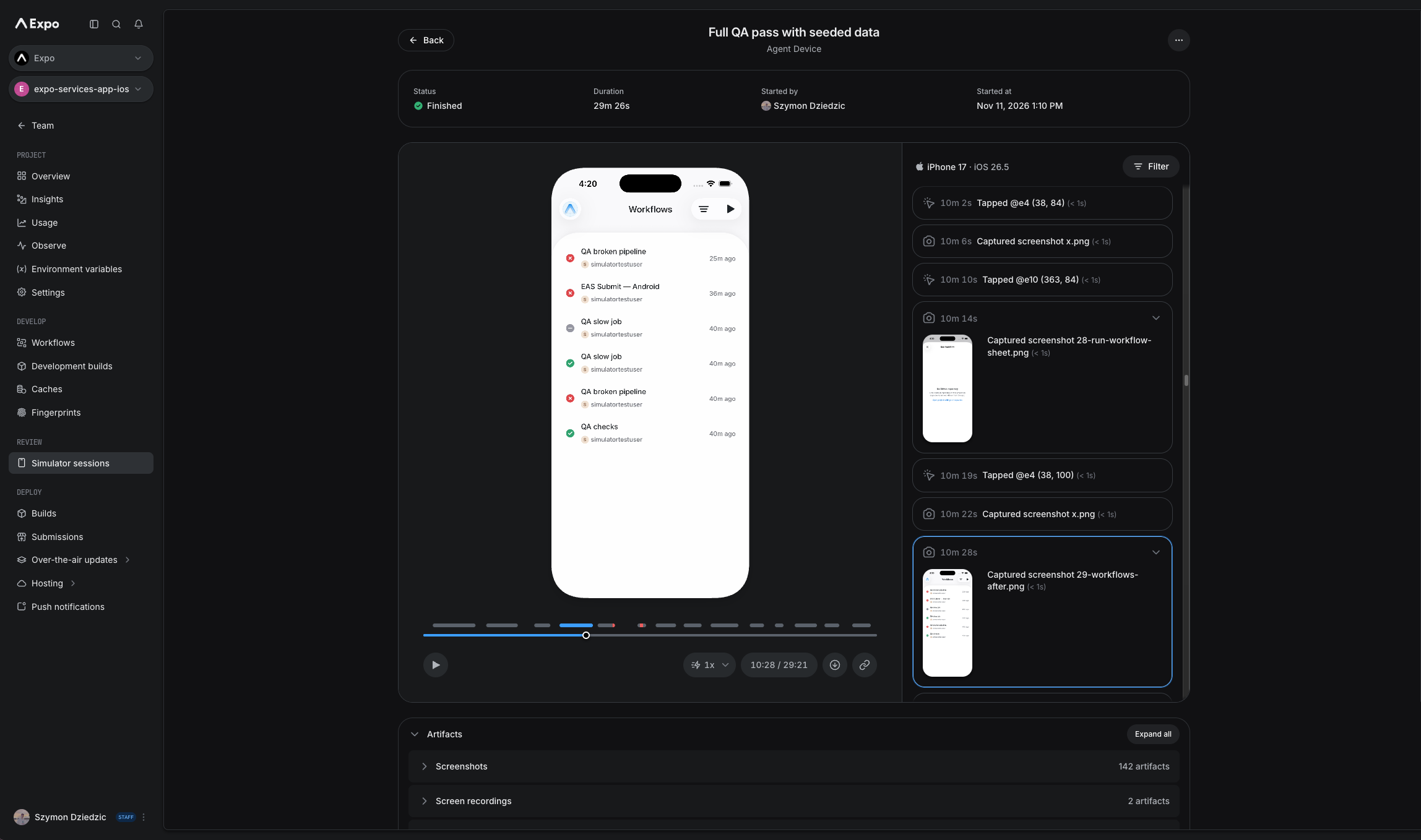
On November 12, mobile framework Expo launched Expo Simulators, available on all paid plans. A coding agent can start a cloud iOS Simulator or Android Emulator with one command, install a build and test it itself; afterward it keeps a full screen recording, screenshots, logs and network traffic that can be attached to a PR for human review. Each session runs on its own VM, no Mac is needed, and the iOS Simulator can be used from Linux or Windows via WSL. Billing is per minute: $0.10 per minute for both iOS and Android, with 60 minutes a month included on Starter and higher plans.
Key Takeaways
- ✓One command to start:
npx eas-cli@latest simulator --platform iosstarts a cloud session; sessions can also start from CI, the REST API, Expo Workflows or GitHub Actions - ✓Works with existing agents: any agent that runs CLI commands, such as Claude Code, Codex or Cursor, can use it with the same agent-device, Argent or Appium commands; Expo ships an eas-simulator skill
- ✓Proof of work: each session keeps a full screen recording, screenshots, logs, network traffic and CPU and memory data that can be attached to a PR, so reviewers need not pull and build the branch
- ✓Isolation and auto-stop: every session gets its own VM and runs at most 2 hours, with optional shorter limits and idle timeouts so forgotten sessions stop billing
- ✓Pricing: $0.10 per minute for both iOS and Android; Starter, Production and Enterprise plans include 60 minutes a month until 2027; Expo adds no AI model of its own
Key Decision Metrics at a Glance
Turn your technical choice into a development budget
Compare 40 dev plans & simulate token costs vs $20/mo subscriptions
Project Links & Resources
Direct AccessIn-Depth Technical Analysis
Background and the problem
Coding agents write mobile code faster and faster, but verification has not kept up. Agents do better when they can check their own changes on a simulator, yet local simulators have several problems: each uses a lot of memory and compute, so seven agents on one laptop means seven simulators; agents sharing a simulator get in each other's way, for example one reinstalls the app in the middle of another's test; no history remains after a session, which makes failures hard to trace; and the iOS Simulator only runs on a Mac, while more and more agents run in cloud sandboxes and CI. Expo, a mainstream framework in the React Native ecosystem, has moved simulators to the cloud specifically for agents.
Architecture and how it works
Expo Simulators gives each session its own VM running an iOS Simulator or Android Emulator, on the same isolation infrastructure as Expo Build, Submit and Workflows. Agents need no new tools: they drive the remote simulator with the same agent-device (default), Argent or Appium commands they use locally. Each session records every agent action and keeps a full screen recording, screenshots, logs, network traffic and CPU and memory data, which the agent can read live or review later. Every session has a live browser view where a human can take over at any time, and there is also a preview-only session that shows the screen without exposing the control interface. Sessions run at most 2 hours, with optional shorter limits and idle timeouts; when one ends, the simulator and control endpoints are destroyed while the recording and logs remain.
Benchmarks and measured results
This is developer infrastructure, so there are no model benchmarks. The verifiable figures are pricing and limits: $0.10 per minute for both iOS and Android; Starter, Production and Enterprise plans include 60 minutes a month until 2027; a single session lasts at most 2 hours. By that math, a 10-minute agent test pass costs about $1. Expo says a group of design partners used it for several months but has not published productivity figures. Its press release notes that Expo adds no AI model of its own, so agent capability depends on whether you plug in Claude Code, Codex or Cursor.
Getting started for developers
The simplest route is to give your agent the skill with npx skills@latest add expo/skills --skill eas-simulator, then ask it to run your app on a cloud simulator. You can also run npx eas-cli@latest simulator --platform ios yourself, pick the controller with --type, install a build with --build-id or --application-archive-url, and use --expo-go with --open-url to connect to local Metro for Fast Refresh. Common uses: an agent tests every PR and posts a recording; a background agent reproduces a tester's bug report, fixes it and attaches before-and-after evidence; team members without a Mac develop iOS apps from Linux or Windows via WSL. Apps outside React Native work too, as long as they install on the iOS Simulator or Android Emulator, including SwiftUI, Jetpack Compose, Flutter and Unity. Expo plans to share details of Agent Sessions by the end of November, a layer that lets enterprises safely trigger agents from customer feedback while guarding against prompt injection.
Benchmark side-by-side against alternatives, or calculate monthly token cost vs subscription break-even.
Discussion & Comments
0Sign in to join the discussion
Connect with AI developers to exchange benchmark insights.