AI Coding Live News

Ant Ling Launches Ling-3.2-flash: 560B/25B Native Multimodal MoE, 1M Context; Vendor Evals Beat Opus 5 on Several Vision Suites; Free for First Two Weeks

On November 5 Ant Group’s Ant Ling (@AntLingAGI) launched Ling-3.2-flash: a 560B-total / 25B-active native multimodal MoE with a 1M context window and native image, text and video input. The official changelog targets complex visual understanding, multimodal long-horizon agents, 3D understanding and interaction, and medical multimodal work; APIs are OpenAI- and Anthropic-compatible and free for the first two weeks. The launch post cites vendor evals versus Claude Opus 5 (max): OmniDocBench1.5 92.21 vs 90.56, ZEROBench(Sub) 43.71 vs 39.52, Vision2Web 85.86 vs 80.20. DesignArena placed it about #10 on Image-to-Frontend with Elo 1238.

Ant Ling Launches Ling-3.2-flash: 560B/25B Native Multimodal MoE, 1M Context; Vendor Evals Beat Opus 5 on Several Vision Suites; Free for First Two Weeks

Key Takeaways

  • Specs (official docs): 560B total / 25B active; 1M context; native image/text/video; four focuses: complex vision, multimodal long-horizon agents, 3D, medical multimodal
  • Availability: chat UI plus OpenAI/Anthropic-compatible APIs; changelog says free for first 2 weeks, then original pricing resumes
  • Vendor evals (official X): OmniDocBench1.5 92.21 vs Opus 5 90.56; ZEROBench(Sub) 43.71 vs 39.52; Vision2Web 85.86 vs 80.20
  • Third party: DesignArena Image-to-Frontend ~#10, Elo 1238; official price page stresses 2-week free promo and has not listed 3.2 USD rates yet
  • Hands-on: model id Ling-3.2-flash; use image_url / video_url blocks; weights not on Hugging Face (API-first)
Read full story
Linked Models & Agents:
⚡ Ling-3.2-flash⚡ Ling-3.1-flash⚡ Claude Opus 5🌐 Ant Ling🌐 Ant Group

Gemini Omni 1.2 Flash GA: Up to 15s Clips, ~30% Lower Output Price, About $0.07/s at 720p; 1.1 Routes to 1.2 on Dec 3

On November 5 Google made Gemini Omni 1.2 Flash (gemini-omni-1.2-flash) generally available in AI Studio and the Gemini API: video generate/edit length rises to 15 seconds, vendor pricing cuts video output about 30% (~$12 per 1M tokens, roughly $0.07/s at 720p), with stronger multi-reference consistency and more natural speech. The changelog states that from December 3, 2026, requests to gemini-omni-1.1-flash will automatically route to 1.2 at 1.2 rates.

Gemini Omni 1.2 Flash GA: Up to 15s Clips, ~30% Lower Output Price, About $0.07/s at 720p; 1.1 Routes to 1.2 on Dec 3

Key Takeaways

  • Model id gemini-omni-1.2-flash live in AI Studio and Gemini API (changelog Nov 5)
  • Clips 3–15s at 360p/720p/1080p/4K; vendor notes consistency across up to 6 reference images
  • Vendor pricing: ~30% lower video output; ~$0.07/s at 720p (~$1.04 for 15s)
  • From 2026-12-03, gemini-omni-1.1-flash auto-routes to 1.2 at 1.2 rates
  • Consumers: Flow, Google Vids, and Gemini App support up to 15s clips and multi-turn edits
Read full story
Linked Models & Agents:
⚡ gemini-omni-1.2-flash⚡ gemini-omni-1.1-flash🌐 Google DeepMind

Gemini API Computer Use Tool Goes GA: Browser, Mobile and Desktop Agents Production-Ready, No Breaking Changes from Preview

The Gemini API changelog shows the Computer Use tool reached general availability on October 30 across both the Interactions and GenerateContent APIs; @GoogleAIStudio announced on November 4 that there are no breaking changes from preview and it is production-ready for browser, mobile and desktop control agents. Official docs list supported models: Gemini 4 Argon, the recommended Gemini 3.8 Flash, Gemini 3.5 Flash-Lite and Gemini 3 Flash Preview. Actions carry an intent field, responses may include a safety_decision requiring user confirmation, and opt-in screenshot prompt-injection detection is available.

Key Takeaways

  • Computer Use is GA on both the Interactions and GenerateContent APIs as of October 30
  • Google says there are no breaking changes from preview, so existing code carries over
  • Three environments: browser, mobile and desktop; Gemini 3.8 Flash is the recommended model
  • Every action includes an intent field; safety_decision can require user confirmation or block
  • Opt-in screenshot prompt-injection detection (Gemini 3.5 Flash-Lite and later, off by default)
Read full story

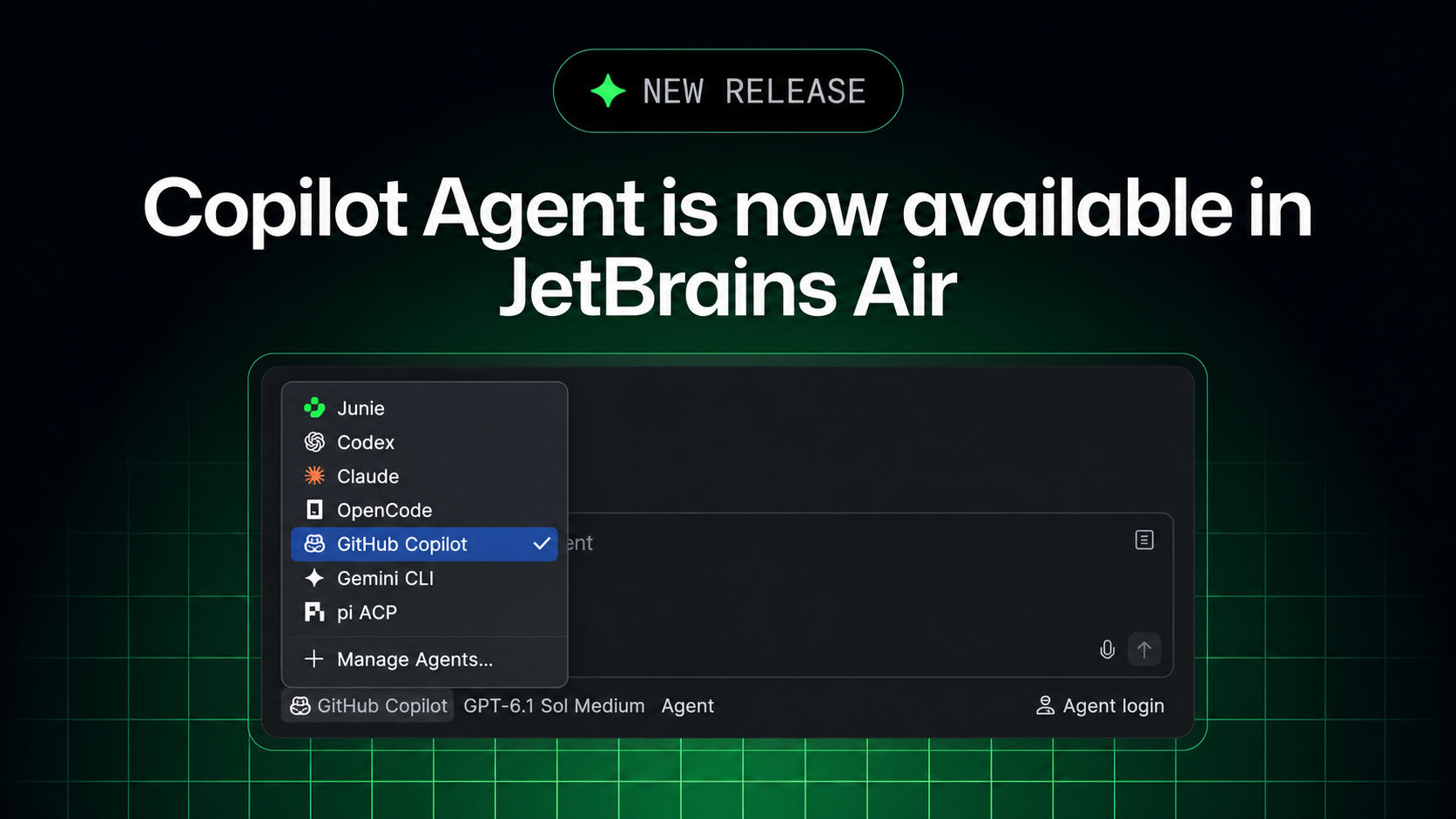
GitHub Copilot Comes to JetBrains Air: Run Coding Tasks Locally in the IDE or in Isolated Cloud Environments via ACP, Billed to Your Copilot Subscription

On November 3 GitHub announced on its official changelog that GitHub Copilot is now available in JetBrains Air. The integration is built on the Agent Client Protocol (ACP): developers pick Copilot in Air's agent picker, delegate coding tasks, track several sessions in parallel and review changes next to their code. Tasks can run locally in a JetBrains IDE or in isolated cloud environments through Air Teams, and they draw on the Copilot subscription rather than JetBrains AI credits.

GitHub Copilot Comes to JetBrains Air: Run Coding Tasks Locally in the IDE or in Isolated Cloud Environments via ACP, Billed to Your Copilot Subscription

Key Takeaways

  • Copilot now appears in JetBrains Air's agent picker and works with an existing Copilot account
  • The integration uses the Agent Client Protocol (ACP) and can be used alongside the existing GitHub Copilot plugin
  • Developers can track multiple agent sessions in parallel and review changes next to their code using project context and IDE tools
  • Cloud tasks run through Air Teams, each in a Docker container on a fresh virtual machine, with traffic through a proxy and no state kept between tasks
  • Cloud tasks use the Copilot plan rather than JetBrains AI credits, but Air analytics do not include Copilot usage and admins cannot set Copilot spending limits inside Air
Read full story
ADSponsored

Gemini 3.8 TTS Adds Voice Remixing: Edit Prebuilt or Designed Voices With Natural-Language Instructions Into New Reusable Voice IDs

The official Gemini API changelog released Voice remixing on November 4. Starting from a prebuilt voice, an Extended Voice Library voice or a Voice Design persona, developers describe changes such as accent, pitch, pacing or age in natural language, and POST /v1beta/voices returns a new standalone voice_ ID usable with Gemini 3.8 Flash TTS and Flash-Lite TTS. It is also available interactively in Google AI Studio.

Key Takeaways

  • New Voice remixing feature: apply relative natural-language edits to an existing voice to create a new standalone voice
  • Uses POST /v1beta/voices (type=prompted, store=true, plus a new prompted.base_voice field) and returns a voice_ ID with a 24kHz WAV preview
  • Base voices can be any of 30 prebuilt voices, an Extended Voice Library voice, or a stored custom voice_ voice in the project
  • The resulting voice_ ID works with gemini-3.8-flash-tts and gemini-3.8-flash-lite-tts and can itself be remixed again
  • The original voice is never modified, and deleting it does not affect voices remixed from it
Read full story
Linked Models & Agents:
⚡ Gemini 3.8 Flash TTS⚡ Gemini 3.8 Flash-Lite TTS🌐 Google🌐 Google DeepMind

GitHub Copilot Comes to Xcode's Built-In Coding Assistant in Public Preview With Xcode 27.3 Beta, Supported on All Copilot Plans

GitHub's official changelog says Copilot now works directly in Xcode's built-in coding assistant, in public preview starting with Xcode 27.3 beta. It needs macOS Tahoe 26.6 or later, is set up under Xcode > Settings > Intelligence, and supports all Copilot plans; the existing Copilot for Xcode extension stays available.

Key Takeaways

  • Copilot joins Xcode's native coding assistant in public preview, starting with Xcode 27.3 beta
  • Requires macOS Tahoe 26.6 or later
  • Set it up under Xcode > Settings > Intelligence; all Copilot plans are supported
  • The existing GitHub Copilot for Xcode extension remains a separate option
  • Apple's Xcode 27.3 beta 1 release notes list it under Coding Intelligence
Read full story

Google Antigravity v2.29 Brings Remote Agents and a Gemini Live Voice Mode: Agent Sessions Run in a Google-Managed Cloud and Keep Working After You Close Your Laptop, Rolling Out to AI Pro and Ultra

Ivan Leo, who works on developer experience at Google DeepMind, shared the official docs for Antigravity's new Remote Agents feature on X on November 4. Per the docs, Remote Agents run agent sessions and tools in an isolated, Google-managed remote environment, so tasks keep going when you close your laptop or browser or switch between desktop and mobile. Sessions start from the Antigravity App, the Antigravity CLI (1.4.12+, agy --remote-agent) or the web at antigravity.google.com, and remote projects can attach GitHub repositories, Google Drive files and uploads. It is rolling out gradually to Google AI Pro and Ultra subscribers on personal accounts; it is not available on the free plan, AI Plus or business accounts. The official changelog shows this ships in Antigravity v2.29.0 (November 3), which also starts rolling out a voice mode powered by Gemini Live for handing requests to the agent by voice, redesigns the Automations page into Scheduled, Always on and Paused lists, and adds a native Jupyter notebook viewer.

Key Takeaways

  • Remote Agents run in an isolated Google-managed environment with no local machine required; Remote Control instead connects to your own computer or server, and the web sidebar switches between them.
  • Three entry points: a New Remote Project in the Antigravity App, agy --remote-agent in CLI 1.4.12+, or antigravity.google.com in any browser, including mobile.
  • Remote projects can attach GitHub repositories (cloned automatically), Google Drive files and uploads (8 MiB per file, 100 MiB per project, 2 GiB per account).
  • CLI remote sessions default to the always-proceed (turbo) permission preset, so commands run without approval; locally installed MCP servers, plugins and skills are not available remotely yet.
  • Also in v2.29.0 (November 3): a Gemini Live voice mode rolling out gradually, a redesigned Automations page, and native rendering of .ipynb notebooks.
Read full story

Kling 4.0 Flash Is Fully Available With an API: 3-20 Second 720P Videos via Text, Image and Omni Reference Generation

Kling AI announced on November 4 that Kling 4.0 Flash is open to all users on the website and via API, and is also reachable through MCP, CLI and AI plugins, including Photoshop, Premiere Pro and After Effects. The official API changelog says the Flash API generates 3 to 20 second videos at 720P, supports text-to-video, image-to-video and Omni reference-to-video, accepts up to 15 inputs per task and bills by total duration.

Kling 4.0 Flash Is Fully Available With an API: 3-20 Second 720P Videos via Text, Image and Omni Reference Generation

Key Takeaways

  • Flash had been in early access for Ultra yearly subscribers since September 28; it is now open to all users and the API.
  • The API paths are kling-4.0-flash under /text-to-video, /image-to-video and /omni-video; image-to-video takes a single first-frame image.
  • Prompts can be up to 26,000 English characters, with up to 10 reference images and 5 reference videos, plus 21:9 and adaptive aspect ratios.
  • Billing is by the total duration of input and output video; unit prices are on the official pricing page and were not stated in the announcement.
Read full story
Linked Models & Agents:
⚡ Kling 4.0 Flash⚡ Kling 4.0🌐 Kling AI🌐 Kuaishou🌐 Adobe

Grok Bot Rolls Out a New Shopping Experience: Find the Best Deal, Compare Product Cards, and Track Orders After You Approve the Buy

On November 3, the official Grok Bot account @bot posted a video promoting a new shopping experience: have the Bot find the best deal, compare items, and track all your orders. The features come from the official changelog for version 0.78.1 (which includes 0.78.0), dated October 27: products appear as cards with photo, rating, price and store plus up to two badges, and three or four results scroll in a carousel. Product pages list in-stock options first, and Buy now starts an order you approve. After purchase the Bot tracks shipping and delivery, with shipment cards showing carrier and stage. Shop Pay can be connected in the Vault Payments tab and set as the preferred method.

Grok Bot Rolls Out a New Shopping Experience: Find the Best Deal, Compare Product Cards, and Track Orders After You Approve the Buy

Key Takeaways

  • The official post went out at 21:50 UTC on November 3 with a 17-second demo video; about 1,687 likes, 122 reposts, 292 replies and 112K views at fetch time
  • Source of the features: the official 0.78.1 changelog entry (October 27, includes 0.78.0), titled Shopping cards and subscription templates
  • Product cards: photo, rating, price and store, up to 2 badges such as Top rated, 3 or 4 results in a carousel; product pages list in-stock options first and disable options no store has
  • Ordering and tracking: orders started with Buy now need your approval; afterward the Bot reports shipping and arrival, and shipment cards show carrier and stage
  • Payments: the Vault has had a Payments tab since 0.77.0 (October 26); 0.78.1 lets you connect Shop Pay and make it the method Bots use first
Read full story
Linked Models & Agents:

Gemini API Deprecates Gemini 2.5 Pro and 2.5 Flash: From December 1, Requests Auto-Route to 3.8 Flash and 3.5 Flash-Lite at the New Models' Rates

In its November 2 Gemini API changelog, Google deprecated gemini-2.5-pro and gemini-2.5-flash and removed both from the Google AI Studio model picker. From December 1, 2026, requests to gemini-2.5-pro will automatically route to gemini-3.8-flash and requests to gemini-2.5-flash to gemini-3.5-flash-lite, billed at the new models' rates. Google flags breaking API changes: stricter function calling and thought_signature validation, thinking_level replacing thinking_budget, and removal of sampling parameters such as temperature and of prefilled model turns. The model string stays valid but behavior can change, so developers should switch model strings and rerun tests before December 1.

Key Takeaways

  • Deadline: from December 1, 2026, gemini-2.5-pro routes to gemini-3.8-flash and gemini-2.5-flash routes to gemini-3.5-flash-lite; API access to 2.5 Pro is already limited to existing users who actively used it.
  • Price change (official price list, per 1M tokens): 2.5 Pro is $1.25 input / $10.00 output for prompts up to 200k; 3.8 Flash is an introductory $0.75 / $3.75 through 2026, rising to $1.50 / $7.50 on January 1, 2027.
  • 2.5 Flash and 3.5 Flash-Lite both cost $0.30 input / $2.50 output for text, while audio input drops from $1.00 to $0.30.
  • The migration guide says to replace thinking_budget with thinking_level (3.8 Flash has no minimal level), drop temperature/top_p/top_k, candidate_count and prefilled model turns, and include call_id and name in every FunctionResponse.
  • It follows the October deprecation of 3.7 Flash, another case of an old model string silently routing to a newer model; 2.5 Pro users will actually land on a Flash-tier model.
Read full story
ADSponsored

OpenAI Agents API ships Auto Review, async compaction, experimental time awareness and mid-session tool updates

The OpenAI Developers account shared a post by Steve (@stevendcoffey), who works on the API at OpenAI, listing five Agents API updates this week: Codex-style Auto Review of commands before execution, compaction that runs in the background, an experimental time-awareness feature, updating a session's tools at any time, and automatic caching of system prompts across all sessions. As of writing, the official API changelog does not list these items yet.

Key Takeaways

  • Five updates: Auto Review, async compaction, time awareness (experimental), updating session tools at any time, and automatic cross-session system prompt caching
  • Auto Review mirrors the Codex mechanism and evaluates commands for potential bad behavior before they run
  • Time awareness lets the model act on time-boxed instructions such as "timebox CI fixes to 10 minutes"
  • The Agents API entered public beta on September 10, and this is another round of features within 7 weeks (after computer use on Sep 29, sandbox prewarming on Oct 9 and Ultrafast mode on Oct 16)
  • OpenAI has published no latency or cost-saving numbers, and the changelog has not listed these items yet
Read full story

LM Studio Bionic 1.1.10 adds the oMLX engine, bringing RAM-plus-SSD KV caching and MLX speculative decoding to local models on Macs

LM Studio posted on X at 15:32 UTC on Oct 29 that users can now download a new oMLX engine inside LM Studio and run it with MLX models they already have. The official changelog lists it in Bionic 1.1.10, alongside speculative decoding for MLX models and an in-app terminal. oMLX is an open-source Apple Silicon inference server maintained by developer jundot (Apache 2.0, about 23,000 GitHub stars) built around continuous batching and a two-tier RAM and SSD KV cache. LM Studio has not published speed comparisons for the engine.

LM Studio Bionic 1.1.10 adds the oMLX engine, bringing RAM-plus-SSD KV caching and MLX speculative decoding to local models on Macs

Key Takeaways

  • LM Studio says the oMLX engine can now be downloaded inside the app and used with existing MLX models; the post has about 540 likes (post)
  • The Bionic 1.1.10 changelog (Oct 29) also lists speculative decoding for MLX models, a public in-app terminal and llama.cpp 2.66.0 extension packs (changelog)
  • oMLX is Apache 2.0 open source with about 23,000 GitHub stars and needs macOS 15+ on Apple Silicon M1 to M5 (GitHub)
  • Its core is a two-tier KV cache: hot blocks stay in RAM, overflow is written to SSD as safetensors, and matching prefixes are restored from disk even after a restart
  • LM Studio has published no speed comparison with its existing MLX engine; one user reported that restart-to-update failed after launch and LM Studio is investigating
Read full story
A
Anthropic@AICoder·
👀103
🔥80

Claude Code 2.1.314 adds a block on writes outside working directories, IdP group routing for the apps gateway, and idle compaction in VS Code and Desktop

Anthropic published Claude Code v2.1.314 on GitHub at 01:06 UTC on Oct 30. The official CHANGELOG lists 119 entries, more than half of them fixes. The new features lean enterprise: permissions.blockWritesOutsideWorkingDirectories makes Write, Edit and NotebookEdit refuse paths outside the working directories in every permission mode; Claude apps gateway upstreams can be limited to IdP groups, and Bedrock upstreams can log which guardrail fired; idle compaction now also runs in VS Code and the Code tab of Claude Desktop. It also fixes sessions failing repeatedly when an admin caps effort, and claude -p exiting 0 with no output when startup failed.

Key Takeaways

  • Size: the official v2.1.314 CHANGELOG has 119 entries, more than half of them fixes; released at 01:06 UTC on Oct 30
  • Safety: the new permissions.blockWritesOutsideWorkingDirectories setting stops Write, Edit and NotebookEdit from writing outside the working directories in every permission mode
  • Enterprise gateway: upstreams take an optional groups list so only developers in those IdP groups are routed there, failover included; Bedrock upstreams gain guardrail_trace
  • Experience: idle compaction now runs in VS Code and the Claude Desktop Code tab, summarizing idle conversations above 200K tokens
  • Fixes: when an admin caps effort, Claude Code lowers it and retries; a failed claude -p startup now prints the error and exits 1
Read full story
Linked Models & Agents:

Google is winding down its async coding agent Jules: read-only after Nov 11 and shut down on Dec 31, with its learnings moving into Antigravity

On Oct 29, Google announced through the official @julesagent account and the Jules changelog that Jules will wind down on December 31, 2026. Users can keep finishing sessions until November 11, after which Jules becomes read-only until the end of the year. Google says its learnings from Jules are going into Google Antigravity, its agent-first development platform, to combine autonomous remote background task execution with an agent-first environment. Google also published an export path for settings, environment variables, scheduled tasks, repositories, memories and every session.

Key Takeaways

  • Key dates: sessions can run until Nov 11, then Jules is read-only, and it shuts down on Dec 31
  • Next stop: Jules learnings go into Google Antigravity; Google does not promise automatic migration of sessions, memories or schedules
  • Export: run npm install -g @google/jules and jules login, then paste the official export prompt into a CLI coding agent; data lands in ~/jules-export
  • Code, branches and PRs already live in GitHub and are unaffected; env-variables.json holds secrets, so keep the export folder out of repos
Read full story

GitHub Enterprise now includes Copilot: $0 seat charge for Enterprise Cloud users, $10 a month Copilot Standalone for others, with AI usage metered from the first request

At Universe 2026 on Oct 28, GitHub announced a new Copilot access billing model: users with a GitHub Enterprise Cloud license pay no Copilot seat charge, and users without one can get Copilot Standalone at $10 per user per month. Both get the same features and models as Copilot Enterprise but no monthly per-seat AI credits; all usage is metered against the enterprise budget from the first request. It is available now only to Enterprise Cloud customers working with a GitHub or Microsoft account team, opens to self-serve customers in stages, and Copilot Business and Enterprise stay on sale.

Key Takeaways

  • Seat charge: $0 for users with a GitHub Enterprise Cloud license; users without one get Copilot Standalone at $10 per user per month
  • Versus the old plans: Copilot Business is $19 per user per month with 1,900 pooled AI credits and Copilot Enterprise is $39 with 3,900; the new model includes no credits and meters usage from the first request
  • When the budget runs out: code completion and next edit suggestions keep working, while Copilot Chat, Copilot code review and Copilot in the cloud need available budget
  • Availability: from Oct 28 only for Enterprise Cloud customers working with a GitHub or Microsoft account team; self-serve opens in stages, and GitHub Free and Team are not eligible
  • Switching is voluntary, but the billing model applies to the whole enterprise, cannot be mixed with Copilot Business or Enterprise seats, and admins still have to assign seats
Read full story